A WHEEL SPINNER WITH A TWIST

Choose the winner.
Or change the odds.

Want a rigged wheel spinner for a surprise, a video, or a playful reveal? Wheel SS lets you choose the next result, avoid an entry, or adjust each entry’s chances without changing the wheel’s appearance. It works on Android, iPhone and iPad, with no ads.

Android, iPhone and iPad · No ads

Aim and Dodge are free. Hidden Odds is premium, included in a one-time purchase that unlocks all six premium features.

Download the appAvailable

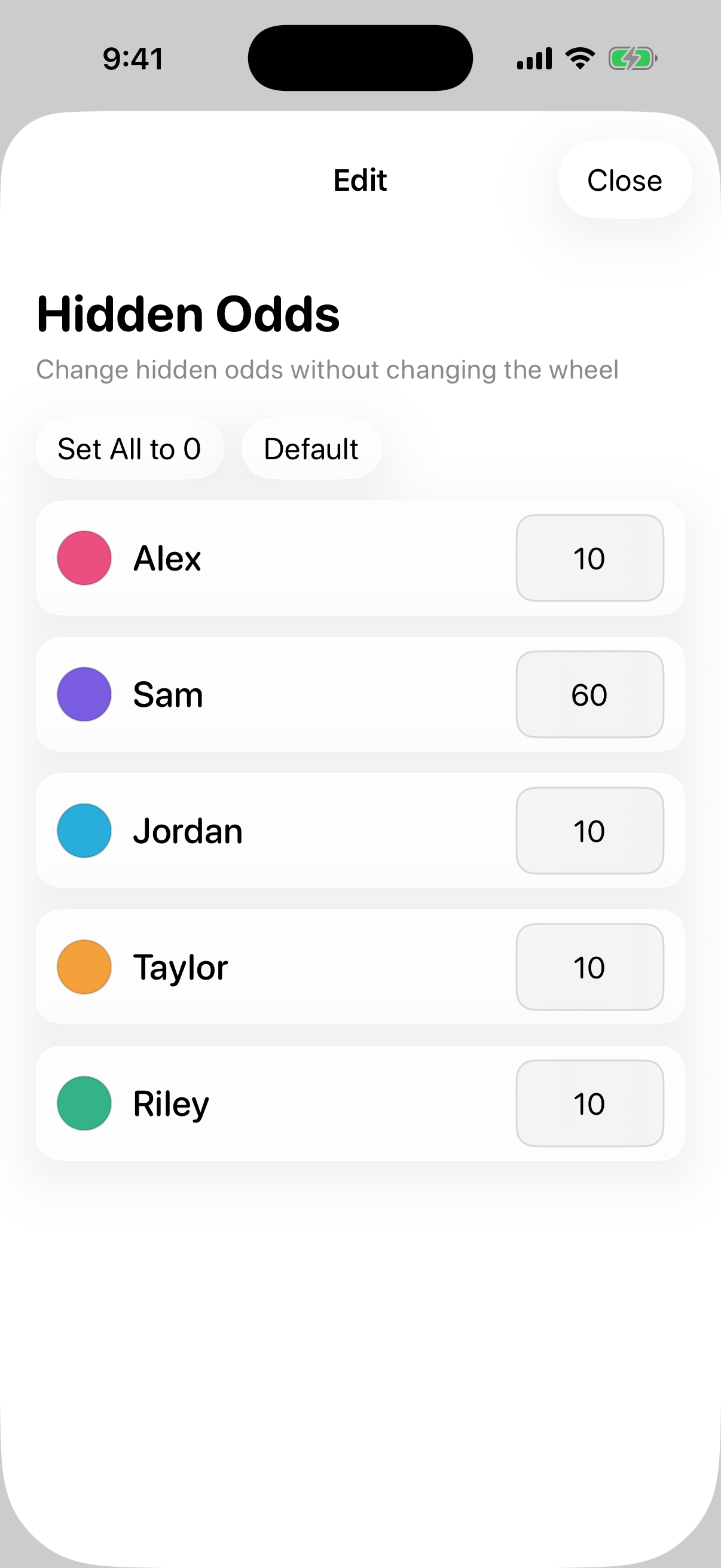
Hidden Odds settings in Wheel SS, showing adjustable weights for wheel entries
Hidden Odds changes the chances behind each entry while keeping the visible wheel the same.

CHOOSE YOUR CONTROL

Three ways to shape the result.

Choose the control that fits your plan. Only one probability control can be active at a time.

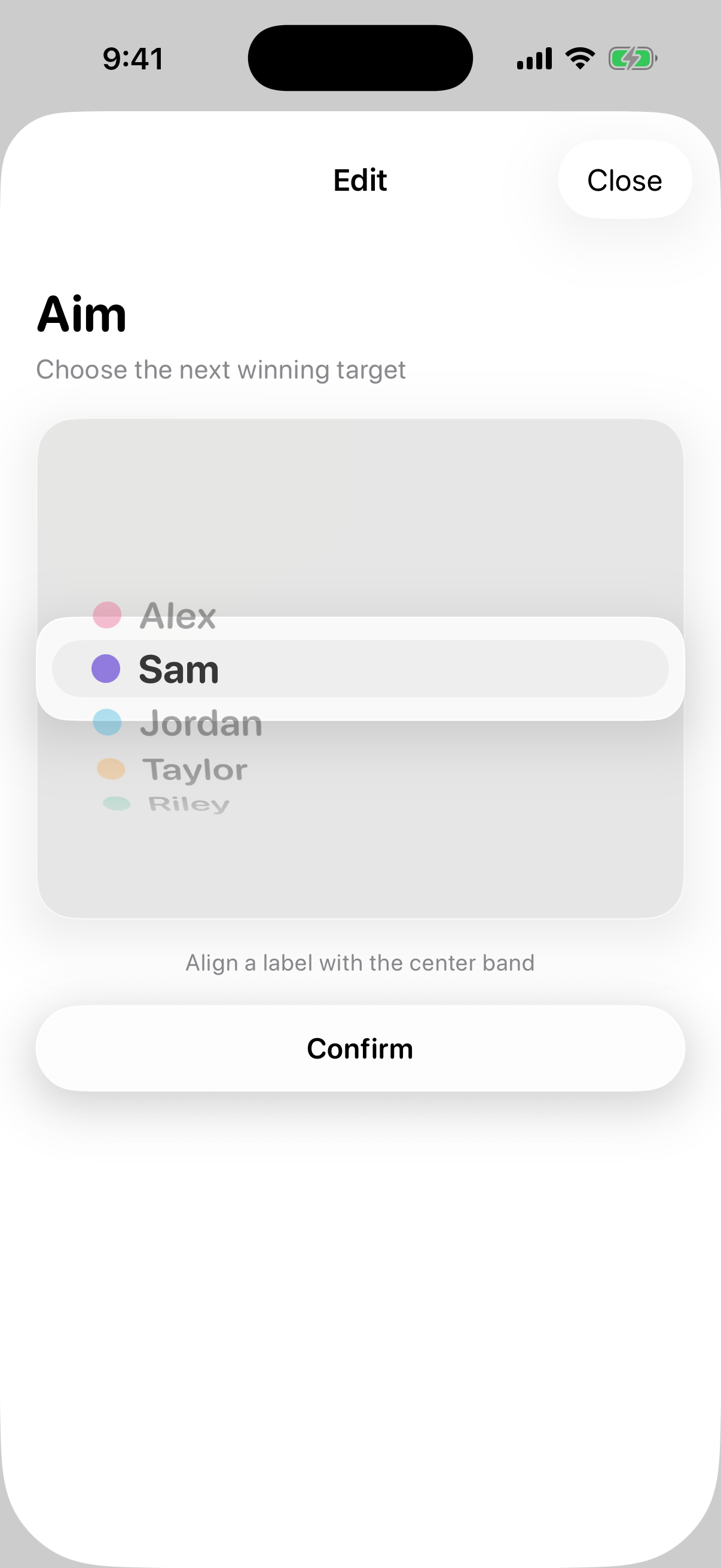
Aim settings for selecting the next winning entry in Wheel SS
Choose which entry should win the next spin.
Aim / Free

Pick the next winner.

Choose an entry before you spin, and Aim makes it the next result. If that entry is no longer available, the wheel uses a normal random draw instead.

Try it forA planned birthday surprise or the reveal at the end of a short video.

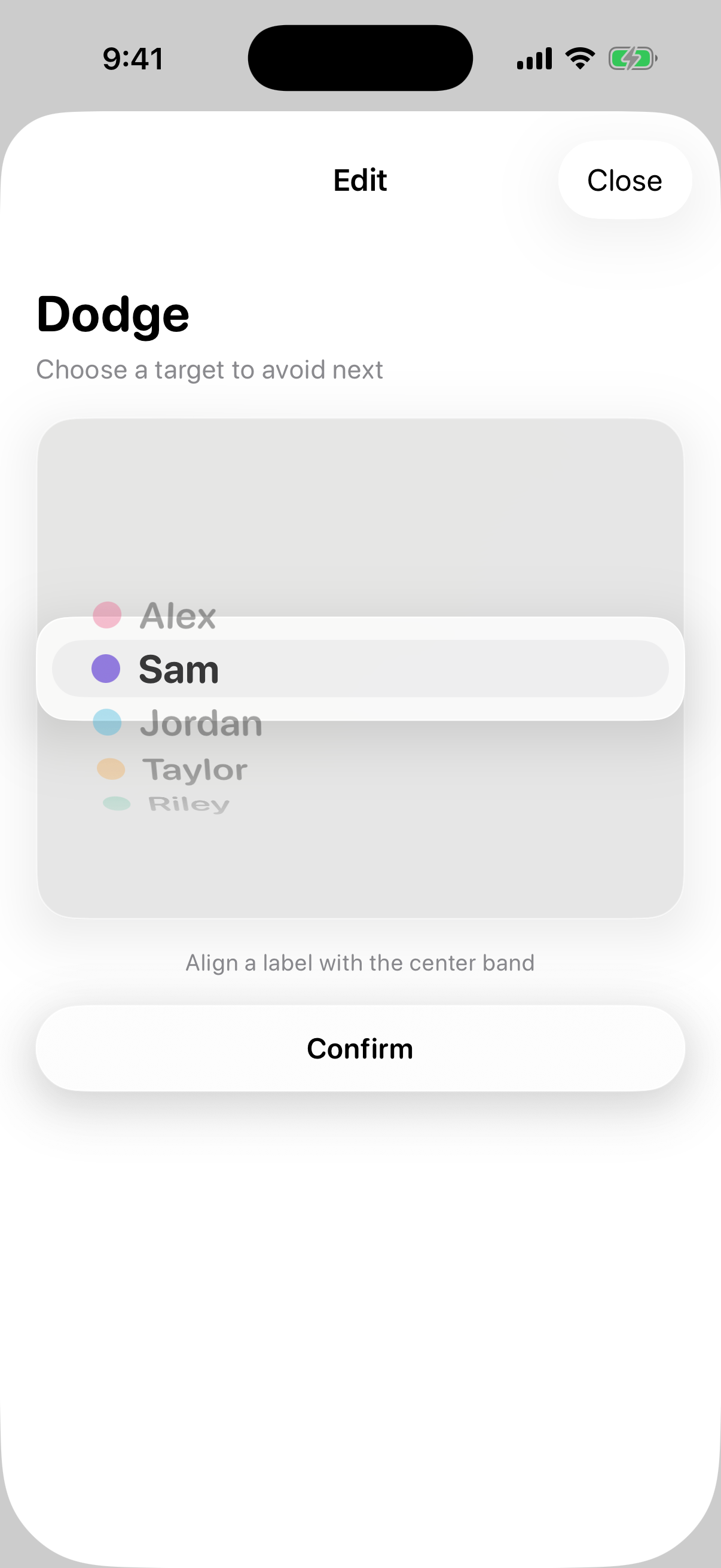
Dodge settings for choosing an entry to avoid in Wheel SS
Avoid a selected entry while other choices are available.
Dodge / Free

Keep one entry out of the result.

Select an entry to avoid, and Dodge draws from the alternatives. It can avoid that entry only while another eligible entry remains.

Try it forA staged party game where one option should stay off the table.

Hidden Odds settings for adjusting internal entry weights in Wheel SS
Adjust the odds independently of the visible segment sizes.
Hidden Odds / Premium · One-time purchase

Change the chances. Keep the wheel’s look.

Set the internal weight of each entry without changing the visible segment sizes or colors. You can make an entry more or less likely to win while keeping the layout you designed.

Try it forA wheel with equal-looking segments where a playful outcome appears more often.

IDEAS FOR YOUR NEXT SPIN

Make the spin part of the story.

Build your wheel with your own entries, then choose how much control the moment needs.

Set up a party surprise

Add everyday options alongside “Open your present,” then use Aim to land on the surprise when everyone is ready. The setup takes place before you return to the wheel.

Plan a video reveal

Choose the final result for a scripted clip so the spin leads into your next shot. Use Aim for one result, or Sequence when you want to plan several spins in advance.

Tune a playful challenge

Keep the wheel’s design balanced while making a lighthearted option more likely with Hidden Odds. The outcome is still drawn using the weights you set.

Use planned results for staged entertainment and surprises friends can enjoy. Leave these controls off when a fair draw determines money, prizes, or other consequential outcomes.


HOW TO SET IT UP

Set it up before the spin.

The controls live inside Star Dial, accessible from the wheel screen.

  1. Build your wheel

    Add your entries and choose their labels, colors, and visible weights. Make sure the entry you want to select or avoid is on the wheel.

  2. Open Star Dial

    Press and hold START. Open the Probability category and choose Aim, Dodge, or Hidden Odds. Only one of these controls can be active at a time.

  3. Apply your settings and spin

    Select the target entry or edit the internal weights, apply your settings, then return to the wheel and spin. Hidden Odds settings do not change the visible segment sizes or colors.

FAQ

Good to know

Is this rigged wheel spinner available on Android?

Yes. Wheel SS is available on Android, iPhone and iPad. The app has no ads, and you can use Aim and Dodge for free.

Which result controls are free?

Aim, which chooses the next result, and Dodge, which avoids an entry while alternatives remain, are free. Hidden Odds and Sequence are premium features. One purchase unlocks all six premium features; check the app or store for current pricing.

How is Hidden Odds different from changing the segment sizes?

The normal wheel uses visible segment weights to determine the odds. Hidden Odds lets you set separate internal weights while leaving the visible sizes and colors unchanged. Making an entry more likely is different from selecting a specific next winner with Aim.

Will the settings appear on the wheel?

The normal wheel view does not display these probability settings. You open them through Star Dial by pressing and holding START. This keeps the wheel view simple; it is not a guarantee that nobody can notice or discover the setup.

Can I combine Aim, Dodge, Hidden Odds, and Sequence?

No. Only one probability control can be active at a time. Choose Aim for a selected next result, Dodge to avoid an entry, Hidden Odds to adjust the internal weights, or Sequence to follow a preset result order.

Can I set the winning order for several spins?

Yes, with the premium Sequence feature. It follows a list of up to 20 results, one per spin, and can include random slots. See the Sequence guide for setup and details.

What if a selected entry is removed or there is nothing else to pick?

If Aim’s target is unavailable, the wheel falls back to a normal random draw. Dodge avoids its selected entry only while alternatives exist, so it cannot exclude the only eligible entry.

DOWNLOAD WHEEL SS

Try it on
your own wheel.

Aim and Dodge are free. Hidden Odds is premium, included in a one-time purchase that unlocks all six premium features. Check the store and app for current pricing and included features.

Download the appAvailable